
Tutorial 5: Fitting Individual Stars with BruteForce#
This tutorial demonstrates how to fit individual stars using brutus’s BruteForce class, which performs fast Bayesian inference over pre-computed model grids.
Topics Covered#
Data preparation (flux units, parallaxes, coordinates)
BruteForce class setup and configuration
Running fits with various options
Result visualization and interpretation
Prerequisites#
This tutorial requires the following brutus data files:
grid_mist_v9.h5- MIST model gridoffsets_mist_v9.txt- Photometric offsetsOrion_l209.1_b-19.9.h5- Example Orion field data (included intutorials/)bayestar2019_v1.h5(optional) - 3D dust map
If you don’t have these files, run the download cell below.
# Download required data files (if not already available locally)
from tutorial_utils import find_brutus_data_file
from brutus.data import fetch_grids, fetch_offsets

# Download grid and offsets if needed
fetch_grids()       # Downloads MIST model grid
fetch_offsets('mist_v9')  # Downloads photometric offsets

# Check dustmap availability (large file, ~2 GB)
try:
    dustmap_path = find_brutus_data_file('bayestar2019_v1.h5')
    print(f"Dustmap found: {dustmap_path}")
except FileNotFoundError:
    from brutus.data import fetch_dustmaps
    fetch_dustmaps()  # Downloads Bayestar dust map
    print("Dustmap downloaded.")

# Note: The Orion field data is included in the tutorials/ directory.
# Imports and setup
import numpy as np
import matplotlib.pyplot as plt
from pathlib import Path
import warnings
warnings.filterwarnings('ignore')

from tutorial_utils import (
    setup_tutorial,
    find_brutus_data_file,
    save_figure as _save_fig,
    print_section,
    load_orion_data,
)

info = setup_tutorial(5, title="Tutorial 05: Fitting Individual Stars with BruteForce")
plots_dir = info['plot_dir']


def save_figure(fig, name):
    """Save figure to this tutorial's plot directory."""
    _save_fig(fig, 5, name)
1. Data Preparation for BruteForce#
BruteForce requires specific data formats:
Photometry in flux units (maggies = 10^(-0.4 * magnitude))
Parallaxes in mas (milliarcseconds) from Gaia
Galactic coordinates (l, b) for applying priors
Let’s load and examine the Orion field data.
from brutus.utils import inv_magnitude, magnitude

# Load example Orion field data
print("Loading Orion field data...")
data = load_orion_data()

print(f"\nLoaded {len(data['phot'])} sources")
print(f"  Photometry shape: {data['phot'].shape}")
print(f"  Filters: Pan-STARRS (grizy) + 2MASS (JHKs) = 8 bands")
print(f"  Valid parallaxes: {np.sum(np.isfinite(data['parallax']))}")
print(f"  Coordinate range: l=[{data['coords'][:, 0].min():.1f}, {data['coords'][:, 0].max():.1f}], "
      f"b=[{data['coords'][:, 1].min():.1f}, {data['coords'][:, 1].max():.1f}] deg")
Loading Orion field data...

Loaded 1642 sources
  Photometry shape: (1642, 8)
  Filters: Pan-STARRS (grizy) + 2MASS (JHKs) = 8 bands
  Valid parallaxes: 1201
  Coordinate range: l=[204.5, 204.9], b=[-19.4, -19.0] deg
# Add systematic photometric uncertainties in quadrature
# The MIST isochrone corrections have systematic uncertainties of ~0.02 mag
# in the optical and ~0.03 mag in the NIR (Speagle et al. 2025, Table 5).
# These should be added to the measurement errors before fitting.

# Systematic uncertainties per band (mag)
sys_err_mag = np.array([0.02, 0.02, 0.02, 0.02, 0.02,   # PS grizy
                        0.03, 0.03, 0.03])                # 2MASS JHKs

# Convert to flux space and add in quadrature
sys_err_flux = data['phot'] * sys_err_mag[np.newaxis, :] * np.log(10) / 2.5
data['err'] = np.sqrt(data['err']**2 + sys_err_flux**2)

# Show the effect
mag_err_after = 2.5 / np.log(10) * data['err'] / np.where(data['phot'] > 0, data['phot'], 1)
filt_names = ['PS_g', 'PS_r', 'PS_i', 'PS_z', 'PS_y', '2MASS_J', '2MASS_H', '2MASS_Ks']
print("Effective magnitude errors after adding systematics:")
for i, name in enumerate(filt_names):
    valid = data['mask'][:, i]
    if np.sum(valid) > 0:
        print(f"  {name:>10s}: min={np.min(mag_err_after[valid, i]):.4f}, "
              f"median={np.median(mag_err_after[valid, i]):.4f} mag")
2. BruteForce Class Setup#
BruteForce performs fast stellar parameter inference by:
Evaluating likelihood over a pre-computed grid of stellar models
Marginalizing analytically over nuisance parameters (distance, extinction)
Incorporating priors (Galactic structure, 3D dust, parallax)
Let’s load the MIST model grid and initialize BruteForce.
from brutus.analysis import BruteForce
from brutus.core import StarGrid
from brutus.data import load_models, filters

# Load MIST model grid
print("Loading MIST model grid...")
grid_file = find_brutus_data_file('grid_mist_v9.h5')

# Define filters (Pan-STARRS + 2MASS)
filt = filters.ps[:-2] + filters.tmass  # Skip PS w and open bands
print(f"\nUsing filters: {filt}")

# Load models
models, labels, label_mask = load_models(grid_file, filters=filt)

print(f"\nLoaded {len(models):,} models")
print(f"  Model shape: {models.shape}")
print(f"  Parameter fields: {list(labels.dtype.names)}")
print(f"  Key parameters:")
print(f"    Mass range: [{labels['mini'].min():.2f}, {labels['mini'].max():.1f}] M_sun")
print(f"    [Fe/H] range: [{labels['feh'].min():.2f}, {labels['feh'].max():.2f}]")
print(f"    log(age) range: [{labels['loga'].min():.2f}, {labels['loga'].max():.2f}]")

# Create StarGrid and initialize BruteForce
grid = StarGrid(models, labels)
bf = BruteForce(grid)

print(f"\nBruteForce initialized with {len(filt)} bands")
Loading MIST model grid...

Using filters: ['PS_g', 'PS_r', 'PS_i', 'PS_z', 'PS_y', '2MASS_J', '2MASS_H', '2MASS_Ks']
Reading entire dataset (49 filters) once...
Extracting 8 requested filters from memory...
Loaded 613,530 models
  Model shape: (613530, 8, 3)
  Parameter fields: ['mini', 'feh', 'eep', 'loga', 'logl', 'logt', 'logg', 'agewt']
  Key parameters:
    Mass range: [0.50, 2.0] M_sun
    [Fe/H] range: [-3.00, 0.45]
    log(age) range: [6.46, 10.14]
Loaded StarGrid with 613,530 models, 8 filters, 8 labels
BruteForce initialized with 613,530 models
  Grid parameters (8): mini, feh, eep, loga, logl, logt, logg, agewt

BruteForce initialized with 8 bands
3. Running BruteForce Fits#
Now let’s fit all sources from the Orion field, demonstrating various fitting options.
Key considerations:
Photometric offsets calibrate models to match observed photometry
3D dust maps provide extinction priors
Parallax constraints from Gaia improve distance estimates
Galactic priors based on position help constrain parameters
# Load photometric offsets (calibration corrections)
from brutus.data import load_offsets

print("Loading photometric offsets...")
try:
    offsets_file = find_brutus_data_file('offsets_mist_v9.txt')
    offsets_mist = load_offsets(offsets_file, filters=filt)
    print("\nPhotometric offsets (multiplicative flux):")
    for band, offset in zip(filt, offsets_mist):
        print(f"  {band}: {offset:.4f}")
except FileNotFoundError:
    offsets_mist = np.ones(len(filt))
    print("  Offsets file not found, using unity offsets")

# Select sources with sufficient photometric coverage
good_sources = np.sum(data['mask'], axis=1) >= 4  # At least 4 bands
idx_fit = np.where(good_sources)[0]

print(f"\nSelected {len(idx_fit)} sources for fitting")
print(f"  Criteria: >=4 bands detected")
print(f"  Average bands per source: {np.mean(np.sum(data['mask'][idx_fit], axis=1)):.1f}")

# Try to load 3D dust map
try:
    dustfile = find_brutus_data_file('bayestar2019_v1.h5')
    print("\n3D dust map (Bayestar) available")
except FileNotFoundError:
    dustfile = None
    print("\n3D dust map not available (will use flat prior)")
Note: brutus recommends at least 4 photometric bands for reliable fits. Users can disable the 3D dust map prior (making it flat over A(V)) by not passing the
dustfileargument tobf.fit().
# Run BruteForce fits
# Save results to tutorials/ directory for use by later tutorials
tutorials_dir = Path(__file__).parent if '__file__' in dir() else Path('.')
output_file = tutorials_dir / 'Orion_l209.1_b-19.9_mist.h5'

import time

print(f"Running BruteForce fits on {len(idx_fit)} sources...")
print("This may take several minutes depending on your hardware.")

t0 = time.time()

bf.fit(
    data=data['phot'][idx_fit],
    data_err=data['err'][idx_fit],
    data_mask=data['mask'][idx_fit],
    data_labels=idx_fit,
    save_file=str(output_file),
    data_coords=data['coords'][idx_fit],
    parallax=data['parallax'][idx_fit],
    parallax_err=data['parallax_err'][idx_fit],
    phot_offsets=offsets_mist,
    dustfile=dustfile,
    Ndraws=500,
    Nmc_prior=20,
    logl_dim_prior=True,
    save_dar_draws=True,
    running_io=False,
    verbose=True
)

elapsed = time.time() - t0
print(f"\nFitting complete in {elapsed:.1f} seconds ({elapsed/60:.1f} minutes).")
print(f"Results saved to {output_file}")
4. Visualizing Individual Results#
Let’s examine individual star fits in detail to understand the posterior distributions and parameter correlations.
# Select a typical example star that passes a reasonable chi2 cut
good_fit = pvals > 1e-3  # p-value threshold for a good fit

# Use the first source that passes the chi2 cut
if good_fit[0]:
    star_idx = 0
else:
    star_idx = np.where(good_fit)[0][0]

data_idx = idx_fit[star_idx]

print(f"Selected example star (index {star_idx}):")
print(f"  p-value = {pvals[star_idx]:.3g}")
print(f"  N_bands = {nbands[star_idx]}")
if np.isfinite(data['parallax'][data_idx]):
    plx_snr = data['parallax'][data_idx] / data['parallax_err'][data_idx]
    print(f"  Parallax = {data['parallax'][data_idx]:.3f} +/- {data['parallax_err'][data_idx]:.3f} mas (SNR = {plx_snr:.1f})")
else:
    print(f"  Parallax = not available")
print(f"  Distance = {mean_dists[star_idx]:.2f} +/- {np.std(dists[star_idx]):.3f} kpc")
print(f"  A(V) = {mean_av[star_idx]:.2f} mag")
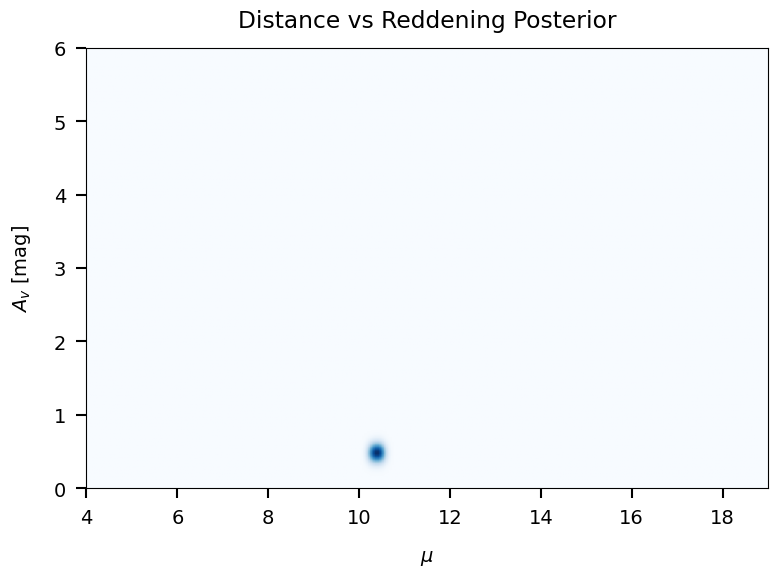
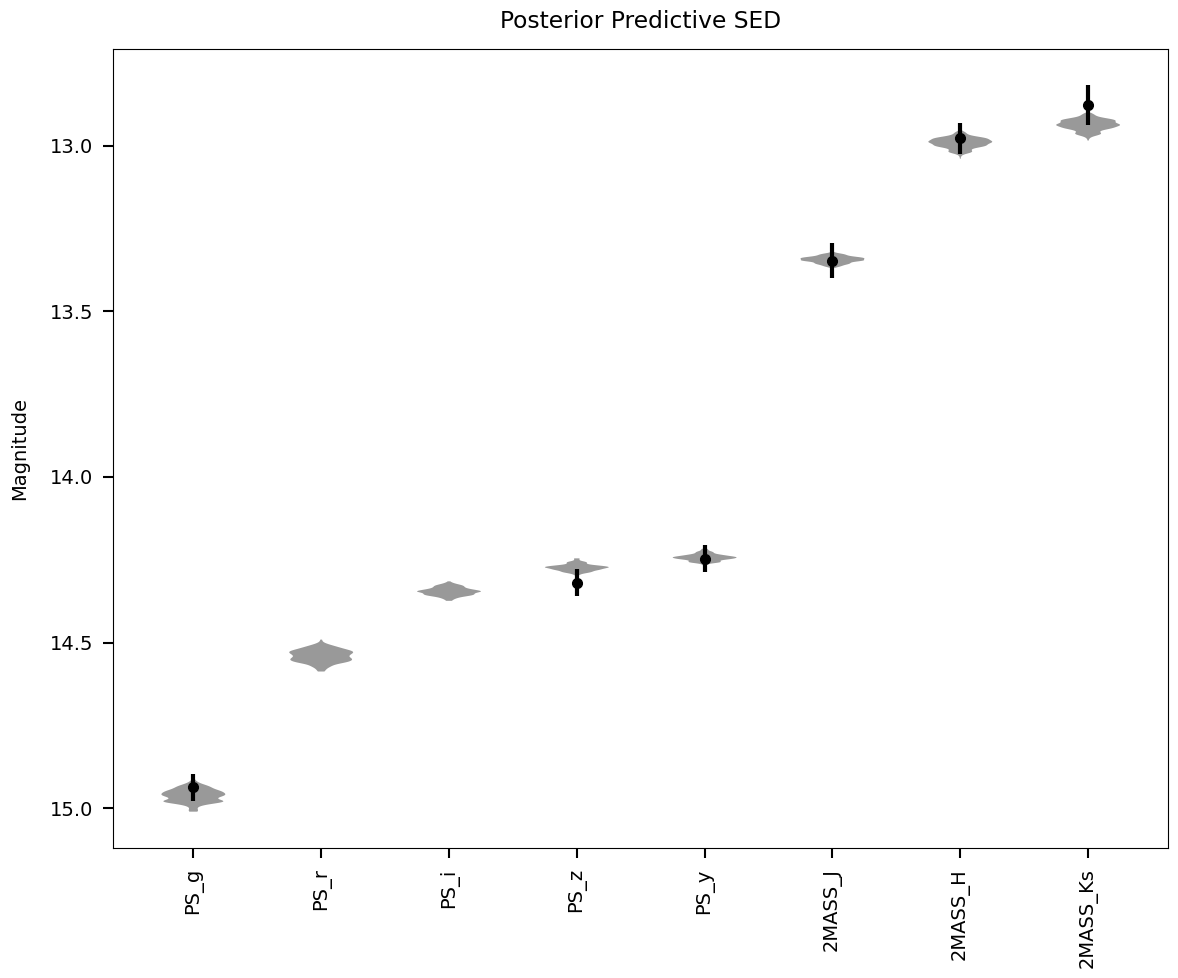
4.1 Visualizing a Single Star#
brutus provides built-in plotting functions for visualizing individual fitting results. We demonstrate three key plots for the selected example star.
from brutus.plotting import dist_vs_red, posterior_predictive, cornerplot

print(f"Visualizing star {star_idx}")
print(f"  p-value = {pvals[star_idx]:.3g}")
print(f"  Distance = {mean_dists[star_idx]:.2f} +/- {np.std(dists[star_idx]):.3f} kpc")
print(f"  A(V) = {mean_av[star_idx]:.2f} mag")
Visualizing star 17
  chi2/n = 1.003
  Distance = 1.20 +/- 0.046 kpc
  A(V) = 0.48 mag
Saved: /mnt/c/Users/joshs/Dropbox/GitHub/brutus/tutorials/plots/tutorial_05/dist_vs_red.png
Saved: /mnt/c/Users/joshs/Dropbox/GitHub/brutus/tutorials/plots/tutorial_05/posterior_predictive.png
5. Impact of the 3D Dust Map Prior#
The Bayestar 3D dust map provides distance-dependent extinction constraints
that can significantly affect the inferred stellar parameters. When a dust map
is available, BruteForce evaluates the extinction prior at each candidate
distance, preferring (distance, A_V) combinations consistent with the
cumulative dust profile along the line of sight.
To quantify this effect, we re-fit the same sources without the dust map prior and compare the resulting distance and extinction posteriors. Sources in highly extincted regions (like Orion) should show the largest differences.
6. Advanced BruteForce Options#
BruteForce.fit() accepts many parameters beyond the basics shown earlier.
Understanding these options lets you tune performance, control output size,
and adjust the statistical model to match your science case.
The parameters fall into several categories:
Likelihood control:
logl_dim_priorswitches between a standard Gaussian log-likelihood and a chi-square dimensionality-corrected version that penalizes over-fitting (or under-fitting) relative to the number of observed bands.Prior adjustments:
apply_agewtadds an age-based weight from the MIST evolutionary tracks (accounting for time spent in each evolutionary phase).apply_gradapplies a gradient-based correction for non-uniform grid spacing.av_gausslets you impose a Gaussian prior on A(V) instead of using the distance-reddening relation from a 3D dust map.Output thresholds:
wt_threshandcdf_threshcontrol which models are kept in the posterior sampling. Raising these thresholds reduces output file size at the cost of potentially trimming the tails of the posterior.
The cell below prints a reference table of these advanced parameters. It does not run a fit (which would be too slow for an interactive tutorial).
# Advanced BruteForce.fit() parameter reference
# This cell documents parameters -- it does NOT run a fit.

advanced_params = [
    # (parameter, default, description)
    ("logl_dim_prior", "True",
     "Use chi-square dimensionality prior on the likelihood.\n"
     "True  -> penalizes models based on chi2 relative to DOF (recommended).\n"
     "False -> standard Gaussian log-likelihood (no DOF correction)."),

    ("apply_agewt", "True",
     "Apply age-based weighting from MIST evolutionary tracks.\n"
     "Accounts for the different amounts of time a star spends\n"
     "in each evolutionary phase (e.g., main sequence vs. giant branch)."),

    ("apply_grad", "True",
     "Apply gradient-based correction for non-uniform grid spacing.\n"
     "Corrects for the fact that model grid points are not evenly\n"
     "distributed in parameter space (mass, age, metallicity)."),

    ("av_gauss", "None",
     "Gaussian prior on A(V) as a (mean, std) tuple.\n"
     "Example: av_gauss=(0.5, 0.2) centers extinction at A(V)=0.5 mag.\n"
     "If None, uses the distance-reddening relation from the dust map."),

    ("wt_thresh", "1e-3",
     "Weight threshold for model selection: keeps models with\n"
     "weight > wt_thresh * max(weight). Lower values keep more\n"
     "models (broader posterior tails) but increase output size."),

    ("cdf_thresh", "2e-3",
     "CDF threshold for model selection. Models contributing less\n"
     "than this fraction of cumulative probability are discarded.\n"
     "Used as fallback if wt_thresh is None."),

    ("Ndraws", "250",
     "Number of posterior samples saved per object.\n"
     "More draws give smoother posteriors but larger output files.\n"
     "Typical range: 100 (quick) to 500 (publication quality)."),

    ("Nmc_prior", "50",
     "Number of Monte Carlo samples for prior integration.\n"
     "Higher values improve accuracy of the distance/extinction\n"
     "marginalization at the cost of computation time."),

    ("rv_gauss", "(3.32, 0.18)",
     "Gaussian prior on R(V) as a (mean, std) tuple.\n"
     "Default based on Schlafly et al. (2016).\n"
     "Set to None to use a flat prior within rvlim bounds."),

    ("running_io", "True",
     "If True, writes each object to disk immediately after fitting.\n"
     "Safer for long runs (recoverable on crash) but slower on\n"
     "network filesystems. Set False to batch-write at the end."),
]

# Print formatted table
print("Advanced BruteForce.fit() Parameters")
print("=" * 72)

for param, default, desc in advanced_params:
    print(f"\n  {param}  (default: {default})")
    print("  " + "-" * 68)
    for line in desc.split("\n"):
        print(f"    {line}")

print("\n" + "=" * 72)
print("\nExample usage with advanced options:")
print("""
    bf.fit(
        data=flux, data_err=flux_err, data_mask=mask,
        data_labels=obj_ids, save_file='results.h5',
        # --- advanced options ---
        logl_dim_prior=True,      # recommended for robust fitting
        apply_agewt=True,         # weight by evolutionary timescales
        apply_grad=True,          # correct for grid spacing
        av_gauss=(0.3, 0.1),     # informative A(V) prior
        rv_gauss=(3.32, 0.18),   # Schlafly+2016 R(V) prior
        wt_thresh=1e-3,           # keep top 0.1% of models
        cdf_thresh=2e-3,          # CDF cutoff
        Ndraws=250,               # posterior samples per source
        Nmc_prior=50,             # MC prior samples
        running_io=True,          # write results incrementally
    )
""")
Advanced BruteForce.fit() Parameters
========================================================================

  logl_dim_prior  (default: True)
  --------------------------------------------------------------------
    Use chi-square dimensionality prior on the likelihood.
    True  -> penalizes models based on chi2 relative to DOF (recommended).
    False -> standard Gaussian log-likelihood (no DOF correction).

  apply_agewt  (default: True)
  --------------------------------------------------------------------
    Apply age-based weighting from MIST evolutionary tracks.
    Accounts for the different amounts of time a star spends
    in each evolutionary phase (e.g., main sequence vs. giant branch).

  apply_grad  (default: True)
  --------------------------------------------------------------------
    Apply gradient-based correction for non-uniform grid spacing.
    Corrects for the fact that model grid points are not evenly
    distributed in parameter space (mass, age, metallicity).

  av_gauss  (default: None)
  --------------------------------------------------------------------
    Gaussian prior on A(V) as a (mean, std) tuple.
    Example: av_gauss=(0.5, 0.2) centers extinction at A(V)=0.5 mag.
    If None, uses the distance-reddening relation from the dust map.

  wt_thresh  (default: 1e-3)
  --------------------------------------------------------------------
    Weight threshold for model selection: keeps models with
    weight > wt_thresh * max(weight). Lower values keep more
    models (broader posterior tails) but increase output size.

  cdf_thresh  (default: 2e-3)
  --------------------------------------------------------------------
    CDF threshold for model selection. Models contributing less
    than this fraction of cumulative probability are discarded.
    Used as fallback if wt_thresh is None.

  Ndraws  (default: 250)
  --------------------------------------------------------------------
    Number of posterior samples saved per object.
    More draws give smoother posteriors but larger output files.
    Typical range: 100 (quick) to 500 (publication quality).

  Nmc_prior  (default: 50)
  --------------------------------------------------------------------
    Number of Monte Carlo samples for prior integration.
    Higher values improve accuracy of the distance/extinction
    marginalization at the cost of computation time.

  rv_gauss  (default: (3.32, 0.18))
  --------------------------------------------------------------------
    Gaussian prior on R(V) as a (mean, std) tuple.
    Default based on Schlafly et al. (2016).
    Set to None to use a flat prior within rvlim bounds.

  running_io  (default: True)
  --------------------------------------------------------------------
    If True, writes each object to disk immediately after fitting.
    Safer for long runs (recoverable on crash) but slower on
    network filesystems. Set False to batch-write at the end.

========================================================================

Example usage with advanced options:

    bf.fit(
        data=flux, data_err=flux_err, data_mask=mask,
        data_labels=obj_ids, save_file='results.h5',
        # --- advanced options ---
        logl_dim_prior=True,      # recommended for robust fitting
        apply_agewt=True,         # weight by evolutionary timescales
        apply_grad=True,          # correct for grid spacing
        av_gauss=(0.3, 0.1),     # informative A(V) prior
        rv_gauss=(3.32, 0.18),   # Schlafly+2016 R(V) prior
        wt_thresh=1e-3,           # keep top 0.1% of models
        cdf_thresh=2e-3,          # CDF cutoff
        Ndraws=250,               # posterior samples per source
        Nmc_prior=50,             # MC prior samples
        running_io=True,          # write results incrementally
    )
7. Summary and Key Takeaways#
This tutorial has demonstrated how to fit individual stars using BruteForce:
Key Steps#
Data Preparation
Convert magnitudes to flux (maggies)
Ensure proper error arrays and masks
Include parallax and coordinates when available
Model Setup
Load pre-computed model grids (MIST)
Apply photometric offsets for calibration
Initialize BruteForce with models
Running Fits
Configure priors (Galactic, dust, parallax)
Set sampling parameters (Ndraws, Nmc_prior)
Save results to HDF5 for analysis
Result Analysis
Examine chi-squared distributions for fit quality
Analyze parameter distributions and correlations
Visualize individual SEDs and posteriors
Best Practices#
Data Quality: Require SNR > 5 and >= 4 bands per source
Photometric Offsets: Always apply appropriate calibrations
Priors: Use 3D dust maps and parallax when available
Validation: Check chi-squared/n values (should be ~1 for good fits)
Uncertainties: Use posterior samples for proper error estimation
Next Steps#
Tutorial 6: Cluster Analysis and Population Fitting
Tutorial 7: 3D Dust Mapping
Tutorial 8: Photometric Calibration
print("Tutorial 5 Complete!")
print("="*60)

tutorials_dir = Path(__file__).parent if '__file__' in dir() else Path('.')

print("\nOutput files:")
for h5_file in sorted(tutorials_dir.glob('Orion_l209.1_b-19.9_mist*.h5')):
    print(f"  - {h5_file.name}")

print("\nGenerated plots:")
for plot_file in sorted(plots_dir.glob('*.png')):
    print(f"  - {plot_file.name}")