
Tutorial 10: Plotting Functions#
This tutorial provides a standalone demonstration of the main plotting functions in
brutus.plotting. The module contains functions for visualizing
posterior distributions, SEDs, photometric offsets, and binned distance-reddening
PDFs.
Functions Covered#
Function |
Module |
Description |
|---|---|---|
|
|
Distance vs reddening posterior plot |
|
|
Bin distance-reddening posterior PDFs |
|
|
Corner plot of multi-dimensional posteriors |
|
|
Posterior predictive SED violin plot |
|
|
1-D photometric offset residuals |
Note: hist2d from brutus.plotting.utils is the low-level 2-D density
histogram utility used internally by cornerplot. It is not demonstrated
separately here but can be called directly for custom 2-D density plots.
Prerequisites#
All sections use pre-computed BruteForce results from
Orion_l209.1_b-19.9_mist.h5and optionally the input photometryOrion_l209.1_b-19.9.h5. If these are not available the cells print a skip message.
# Setup: imports and plot style
import warnings

import numpy as np
import matplotlib.pyplot as plt

warnings.filterwarnings("ignore")

# Tutorial utilities
from tutorial_utils import (
    setup_tutorial,
    save_figure,
    print_section,
    find_brutus_data_file,
    load_example_results,
)

# Run the standardized tutorial bootstrap
info = setup_tutorial(10, title="Tutorial 10: Plotting Functions")

# Matplotlib defaults for this notebook
plt.rcParams["figure.figsize"] = (10, 6)
Tutorial 10: Plotting Functions
===============================

Checking data requirements for Tutorial 10
==========================================
  Found: Orion_l209.1_b-19.9_mist.h5

  All required files available
# ---------------------------------------------------------------
# Load pre-computed BruteForce results, input photometry, and models
# ---------------------------------------------------------------
import h5py
from brutus.utils import inv_magnitude
from brutus.data import load_models

DATA_AVAILABLE = False
PHOT_AVAILABLE = False
MODELS_AVAILABLE = False

# Filter names used in the Orion fitting run (PS1 grizy + 2MASS JHKs)
FILTER_NAMES = ['PS_g', 'PS_r', 'PS_i', 'PS_z', 'PS_y',
                '2MASS_J', '2MASS_H', '2MASS_Ks']
N_OBJ_RESULTS = None

# 1. Load BruteForce results
try:
    results = load_example_results("Orion_l209.1_b-19.9_mist.h5")
    DATA_AVAILABLE = True
    N_OBJ_RESULTS = results["model_idx"].shape[0]
    n_samps = results["model_idx"].shape[1]
    print("Loaded BruteForce results.")
    print(f"  File      : {results['filename']}")
    print(f"  Objects   : {N_OBJ_RESULTS}")
    print(f"  Samples   : {n_samps}")
    for key in sorted(results):
        if key == "filename":
            continue
        arr = results[key]
        if isinstance(arr, np.ndarray):
            print(f"  {key:15s}  shape={str(arr.shape):20s}  dtype={arr.dtype}")
except FileNotFoundError as exc:
    print(f"Results file not found -- sections that need it will be skipped.")
    print(f"  ({exc})")

# 2. Load input photometry (subset to match results)
try:
    phot_path = find_brutus_data_file("Orion_l209.1_b-19.9.h5")
    with h5py.File(phot_path, "r") as f:
        fpix = f["photometry"]["pixel 0-0"]
        mag_all = fpix["mag"][:]
        magerr_all = fpix["err"][:]
        plx_all = fpix["parallax"][:]  # already in mas
        plx_err_all = fpix["parallax_error"][:]
        coords_all = np.c_[fpix["l"][:], fpix["b"][:]]

    # Convert to flux
    flux_all, flux_err_all = inv_magnitude(mag_all, magerr_all)
    mask_all = np.isfinite(magerr_all)

    # Subset to match results objects (first N)
    n_sub = N_OBJ_RESULTS if N_OBJ_RESULTS is not None else flux_all.shape[0]
    phot_flux = flux_all[:n_sub]
    phot_flux_err = flux_err_all[:n_sub]
    phot_mask = mask_all[:n_sub]
    phot_parallax = plx_all[:n_sub]
    phot_parallax_err = plx_err_all[:n_sub]
    phot_coords = coords_all[:n_sub]

    PHOT_AVAILABLE = True
    print(f"\nLoaded input photometry from {phot_path}")
    print(f"  Total objects  : {flux_all.shape[0]}")
    print(f"  Subset matched : {n_sub}")
    print(f"  Filters        : {flux_all.shape[1]}")
except FileNotFoundError as exc:
    print(f"\nInput photometry not found (optional).")
    print(f"  ({exc})")

# 3. Load model grid (needed for SED, cornerplot, and offset plots)
try:
    grid_path = find_brutus_data_file("grid_mist_v9.h5")
    models, grid_labels, label_mask = load_models(grid_path, filters=FILTER_NAMES)
    MODELS_AVAILABLE = True
    print(f"\nLoaded model grid from {grid_path}")
    print(f"  models shape  : {models.shape}  (Nmodels, Nfilt, Ncoeff)")
    print(f"  labels shape  : {grid_labels.shape}")
    print(f"  labels fields : {list(grid_labels.dtype.names)}")
except FileNotFoundError as exc:
    print(f"\nModel grid not found.")
    print(f"  ({exc})")
Loaded BruteForce results.
  File      : /home/user/brutus/tutorials/Orion_l209.1_b-19.9_mist.h5
  Objects   : 207
  Samples   : 500
  labels           shape=(207,)                dtype=int64
  mc_ess           shape=(207, 500)            dtype=float32
  ml_av            shape=(207, 500)            dtype=float32
  ml_cov_sar       shape=(207, 500, 3, 3)      dtype=float32
  ml_rv            shape=(207, 500)            dtype=float32
  ml_scale         shape=(207, 500)            dtype=float32
  model_idx        shape=(207, 500)            dtype=int32
  obj_Nbands       shape=(207,)                dtype=int16
  obj_chi2min      shape=(207,)                dtype=float32
  obj_log_evid     shape=(207,)                dtype=float32
  obj_log_post     shape=(207, 500)            dtype=float32
  samps_dist       shape=(207, 500)            dtype=float32
  samps_dred       shape=(207, 500)            dtype=float32
  samps_logp       shape=(207, 500)            dtype=float32
  samps_red        shape=(207, 500)            dtype=float32

Loaded input photometry from /home/user/brutus/tutorials/Orion_l209.1_b-19.9.h5
  Total objects  : 207
  Subset matched : 207
  Filters        : 8
Reading entire dataset (49 filters) once...
Extracting 8 requested filters from memory: ['PS_g', 'PS_r', 'PS_i', 'PS_z', 'PS_y', '2MASS_J', '2MASS_H', '2MASS_Ks']
Dropping constant 'afe' label column (single-afe grid, afe=0)...
Loaded model grid from /home/user/brutus/tutorials/grid_mist_v9.h5
  models shape  : (613530, 8, 3)  (Nmodels, Nfilt, Ncoeff)
  labels shape  : (613530,)
  labels fields : ['mini', 'feh', 'eep', 'loga', 'logl', 'logt', 'logg', 'agewt']
Section 2: Distance-Extinction Visualization#
This section demonstrates two closely related functions for visualizing distance-extinction posteriors:
dist_vs_redcreates a publication-ready 2-D density image of the joint distance-reddening posterior. It accepts a single object ((Nsamps,)arrays) or multiple objects ((Nobj, Nsamps)arrays, in which case the average of the per-object 2-D PDFs is plotted), and optional importanceweights(either(Nsamps,)shared across objects or(Nobj, Nsamps)).bin_pdfs_distredis the data-preparation workhorse behinddist_vs_red. It bins raw BruteForce outputs for multiple objects into 2-D PDFs over the distance-reddening plane.
dist_vs_red Signature#
dist_vs_red(data, ebv=None, dist_type='distance_modulus', lndistprior=None,
            coord=None, avlim=(0., 6.), rvlim=(1., 8.), weights=None,
            parallax=None, parallax_err=None, Nr=300, cmap='Blues',
            bins=300, span=None, smooth=0.015, plot_kwargs=None,
            truths=None, truth_color='red', truth_kwargs=None, rstate=None)
data is a 4-tuple (scales, avs, rvs, covs_sar) – the raw per-model
BruteForce outputs – or a 3-tuple (dists, reds, dreds) of pre-drawn
samples. The function also needs Galactic coordinates (coord) and
parallax information when regenerating distance samples from the 4-tuple
format. A single (l, b) coordinate is broadcast to all objects.
bin_pdfs_distred Signature#
bin_pdfs_distred(
    data,           # 4-tuple (scales, avs, rvs, covs_sar) or 3-tuple
    cdf=False, ebv=False, dist_type='distance_modulus',
    lndistprior=None, coord=None, avlim=(0., 6.), rvlim=(1., 8.),
    weights=None, parallaxes=None, parallax_errors=None, Nr=100,
    bins=(750, 300), span=None, smooth=0.01, rstate=None, verbose=False,
    R_solar=8.2, Z_solar=0.025,
)
Returns (binned_vals, xedges, yedges) where binned_vals has shape
(Nobj, Nxbin, Nybin). With cdf=True the PDFs are cumulated along the
reddening axis (useful when evaluating MAP line-of-sight dust fits).
Optional weights must have shape (Nobj, Nsamps), be finite and
non-negative, and sum to a positive value for each object; each object’s
binned PDF is normalized by its total weight, so results are invariant
to the absolute scale of the weights.
2a. dist_vs_red
===============
Saved: /home/user/brutus/tutorials/plots/tutorial_10/dist_vs_red_demo.png
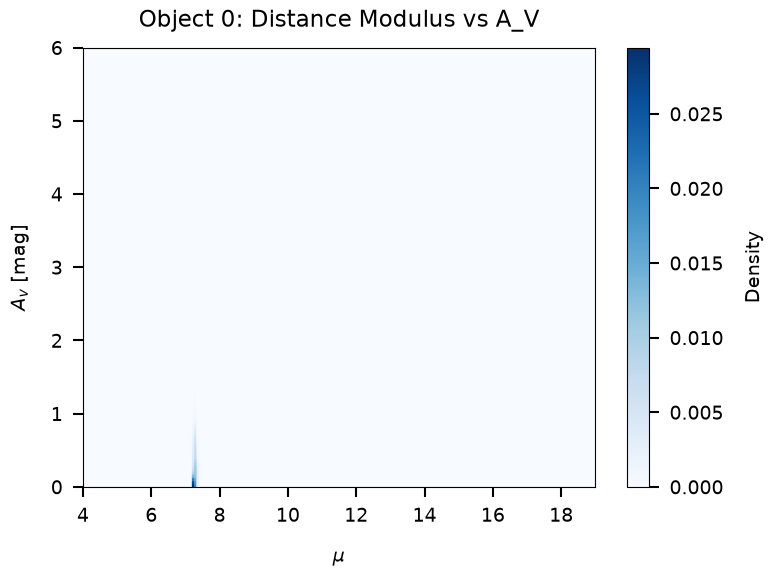
Plotted object 0.
  Binned histogram shape : (300, 300)
  Distance modulus range : [4.0, 19.0]
  A_V range              : [0.0, 6.0]
Binning Distance-Reddening PDFs with bin_pdfs_distred#
bin_pdfs_distred operates on multiple objects simultaneously and
returns the raw binned arrays, which can be further processed or
visualized directly.
2b. bin_pdfs_distred
====================


binned_vals shape : (5, 200, 100)  (Nobj, Nxbin, Nybin)
xedges shape      : (201,)
yedges shape      : (101,)
Binning object 1/5
Binning object 2/5
Binning object 3/5
Binning object 4/5
Binning object 5/5
Saved: /home/user/brutus/tutorials/plots/tutorial_10/bin_pdfs_distred_demo.png

Plotted 5 objects.
Section 3: cornerplot – Corner Plot of Posteriors#
cornerplot generates a corner plot showing 1-D and 2-D marginalized
posteriors for all stellar parameters (from the model grid labels) plus
A_V, R_V, parallax, and distance.
Signature#
cornerplot(idxs, data, params,
           lndistprior=None, coord=None, avlim=(0., 6.), rvlim=(1., 8.),
           weights=None, parallax=None, parallax_err=None, Nr=500,
           applied_parallax=True, pcolor='blue', parallax_kwargs=None,
           span=None, quantiles=[0.025, 0.5, 0.975], color='black',
           smooth=10, hist_kwargs=None, hist2d_kwargs=None, labels=None,
           label_kwargs=None, show_titles=False, title_fmt='.2f',
           title_kwargs=None, title_quantiles=[0.025, 0.5, 0.975],
           truths=None, truth_color='red', truth_kwargs=None,
           max_n_ticks=5, top_ticks=False, use_math_text=False,
           verbose=False, fig=None, rstate=None,
           R_solar=8.2, Z_solar=0.025)
Required inputs:
idxs– resampled model indices (shape(Nsamps,)).data– 4-tuple(scales, avs, rvs, covs_sar)or 3-tuple(dists, reds, dreds).params– structured array of model parameters (from the grid viaload_models).
Section 3: cornerplot
=====================
Quantiles:
mini [(0.025, np.float64(0.525)), (0.5, np.float64(0.525)), (0.975, np.float64(0.55))]
Quantiles:
feh [(0.025, np.float64(-0.6999999999999988)), (0.5, np.float64(-0.14999999999999836)), (0.975, np.float64(-0.04999999999999827))]
Quantiles:
eep [(0.025, np.float64(298.0)), (0.5, np.float64(316.0)), (0.975, np.float64(328.0))]
Quantiles:
loga [(0.025, np.float64(9.619189908727703)), (0.5, np.float64(9.92850420789926)), (0.975, np.float64(10.12182927973961))]
Quantiles:
logl [(0.025, np.float64(-1.2287149633822887)), (0.5, np.float64(-1.1778912726456419)), (0.975, np.float64(-1.0727715791579533))]
Quantiles:
logt [(0.025, np.float64(3.5752711411662728)), (0.5, np.float64(3.5850754587862723)), (0.975, np.float64(3.6197787155058814))]
Quantiles:
logg [(0.025, np.float64(4.69183374433364)), (0.5, np.float64(4.714160374084659)), (0.975, np.float64(4.732513665493004))]
Quantiles:
Av [(0.025, np.float64(0.005807292318427446)), (0.5, np.float64(0.20063050546022465)), (0.975, np.float64(0.8234394507993912))]
Quantiles:
Rv [(0.025, np.float64(3.0133908696015967)), (0.5, np.float64(3.4046747701687115)), (0.975, np.float64(3.774857711660002))]
Quantiles:
Parallax [(0.025, np.float64(3.3918605332838947)), (0.5, np.float64(3.5221730852481894)), (0.975, np.float64(3.60768702366681))]
Quantiles:
Distance [(0.025, np.float64(0.2771859070478935)), (0.5, np.float64(0.28391563270996995)), (0.975, np.float64(0.29482344282352635))]
Saved: /home/user/brutus/tutorials/plots/tutorial_10/cornerplot_demo.png
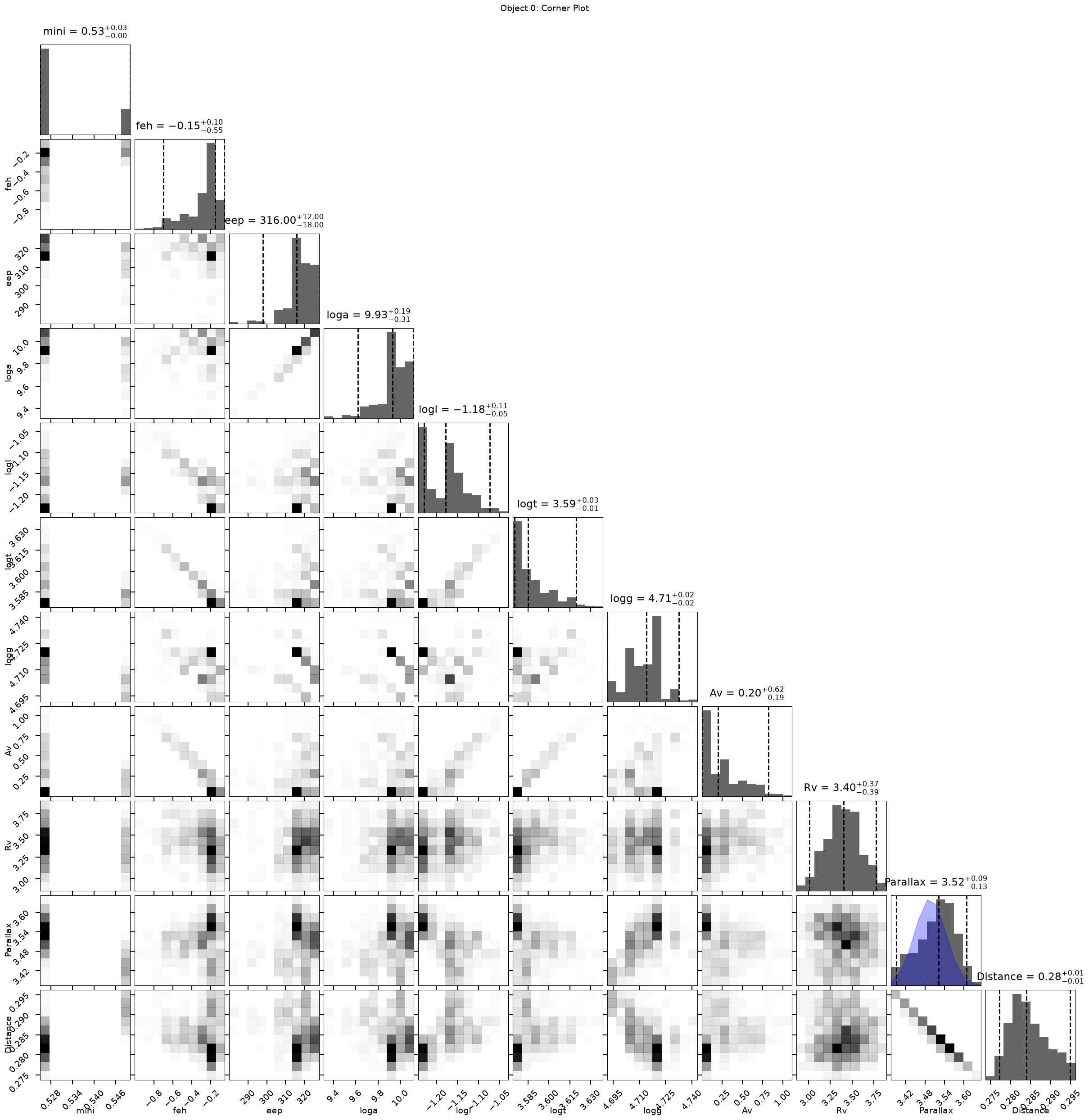
Corner plot has 11 rows/columns of panels.
Section 4: posterior_predictive – SED Posterior Predictive Plot#
posterior_predictive shows the predicted SED (as violin plots across
filters) compared with observed photometry. It uses the model
polynomial coefficients array (models) and pre-computed posterior
samples (model_idx, samps_red, samps_dred, samps_dist) from
BruteForce output.
Signature#
posterior_predictive(models, idxs, reds, dreds, dists,
                     weights=None, flux=False,
                     data=None, data_err=None, data_mask=None,
                     offset=None, vcolor='black', pcolor='black',
                     labels=None, rstate=None, psig=2., fig=None)
Section 4: posterior_predictive
===============================
Saved: /home/user/brutus/tutorials/plots/tutorial_10/posterior_predictive_demo.png
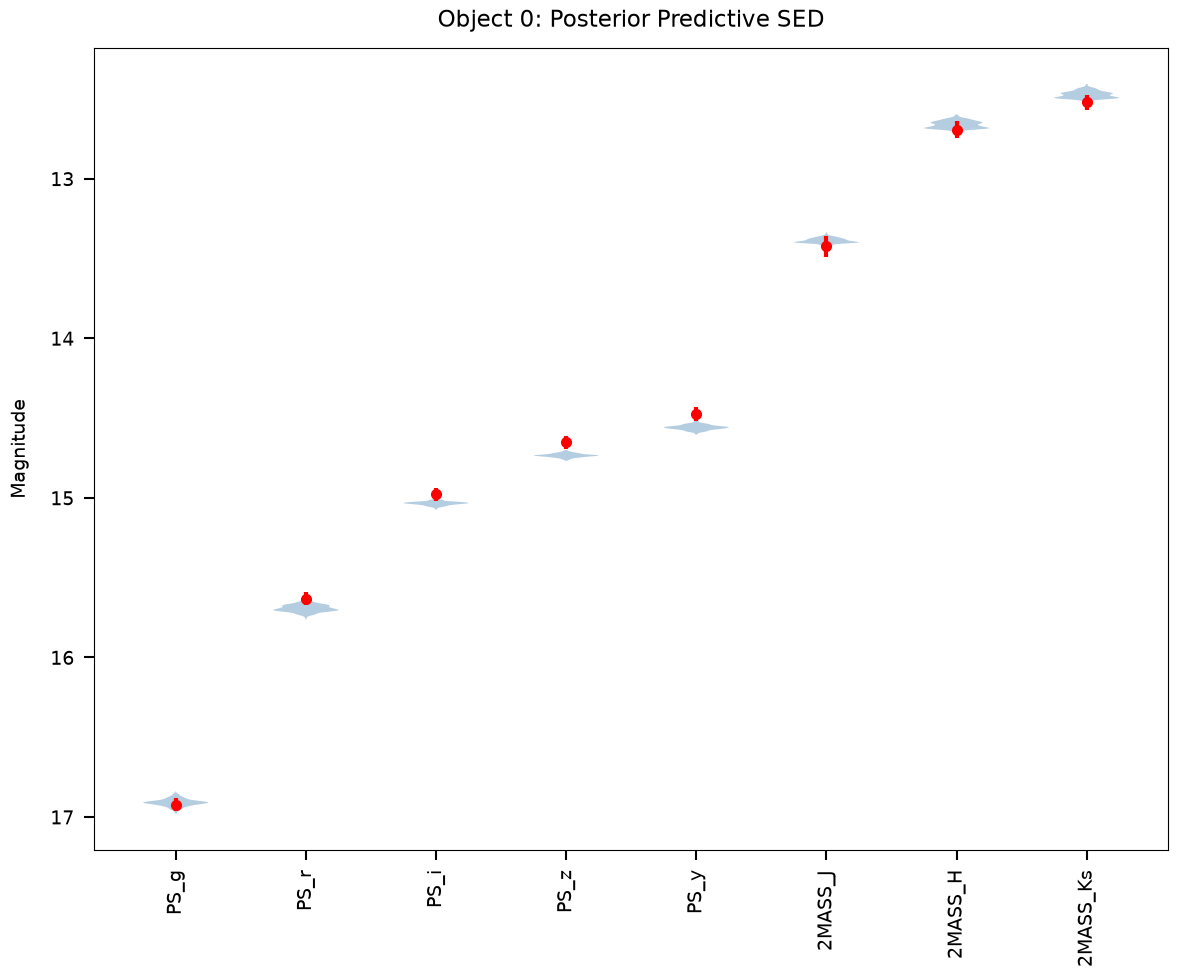
Violin bodies plotted across 8 filters.
Section 5: photometric_offsets – 1-D Offset Residuals#
photometric_offsets computes mag_pred - mag_obs for every band and
plots the residual as a function of observed magnitude. Each panel
corresponds to one photometric filter. This is a diagnostic tool for
identifying systematic model-data discrepancies as a function of brightness.
Note: this is a plotting function (brutus.plotting.offsets), distinct
from the analysis function of the same name (brutus.analysis.offsets)
demonstrated in Tutorial 8. The analysis function computes multiplicative
calibration corrections; this function visualizes magnitude residuals.
Signature#
photometric_offsets(
    phot, err, mask, models, idxs, reds, dreds, dists,
    x=None, flux=True, weights=None, bins=100,
    offset=None, dim_prior=True, plot_thresh=0.,
    cmap='viridis', xspan=None, yspan=None,
    titles=None, xlabel=None, plot_kwargs=None, fig=None,
)
Section 5: photometric_offsets
==============================
Saved: /home/user/brutus/tutorials/plots/tutorial_10/photometric_offsets_demo.png
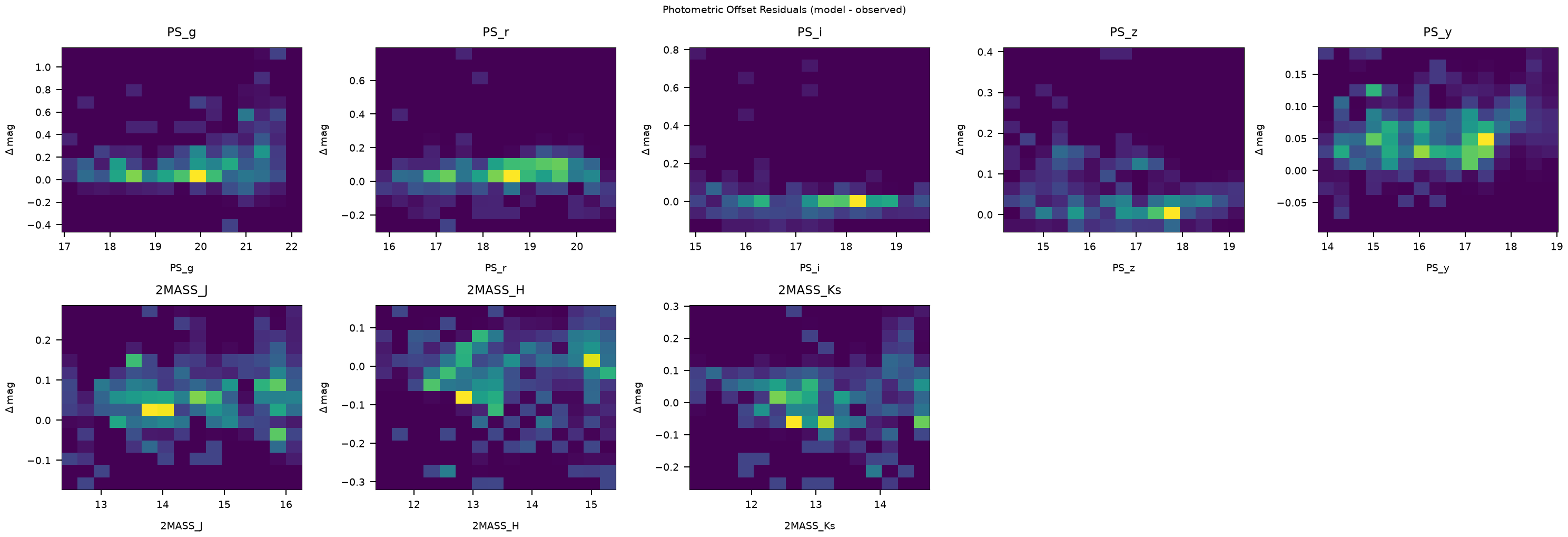
Plotted residuals for 8 filters across 207 objects.
Summary#
This tutorial demonstrated the main plotting functions in brutus.plotting
using real BruteForce results from the Orion sightline (Tutorial 5):
# |
Function |
Section |
Data Used |
|---|---|---|---|
1 |
|
Section 2 |
BruteForce posteriors |
2 |
|
Section 2 |
BruteForce posteriors |
3 |
|
Section 3 |
BruteForce posteriors + grid labels |
4 |
|
Section 4 |
BruteForce posteriors + grid models |
5 |
|
Section 5 |
BruteForce posteriors + models + photometry |
Key Points#
dist_vs_redandbin_pdfs_distredwork together: the latter bins the data and the former wraps it into a publication-ready figure.cornerplotgives a full multi-parameter view including stellar labels, A_V, R_V, parallax, and distance. It useshist2dinternally for the off-diagonal 2-D density panels.posterior_predictivecompares predicted and observed SEDs filter by filter.photometric_offsetsis a diagnostic visualization tool for identifying systematic model-data residuals. It is distinct from the calibration analysis function of the same name inbrutus.analysis.offsets(demonstrated in Tutorial 8).